
AI Assistant
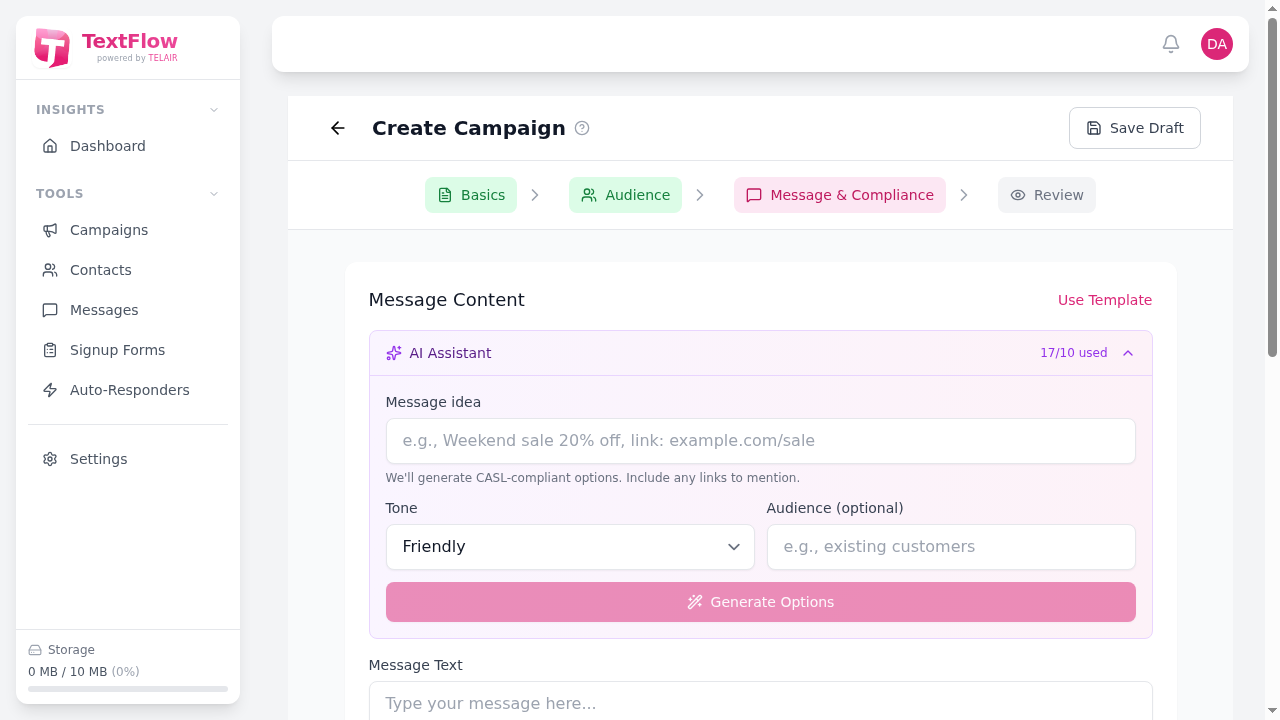
The AI Assistant helps you create effective SMS messages by generating options, analyzing compliance, and suggesting improvements. Available in the campaign creation workflow.
Overview
Section titled “Overview”The AI Assistant provides two powerful features:
- Generate Messages: Create SMS content from a topic description
- Analyze Messages: Check existing messages for compliance and quality
Generating Messages
Section titled “Generating Messages”How to Generate
Section titled “How to Generate”- Go to Campaigns > Create Campaign
- Navigate to the Message step
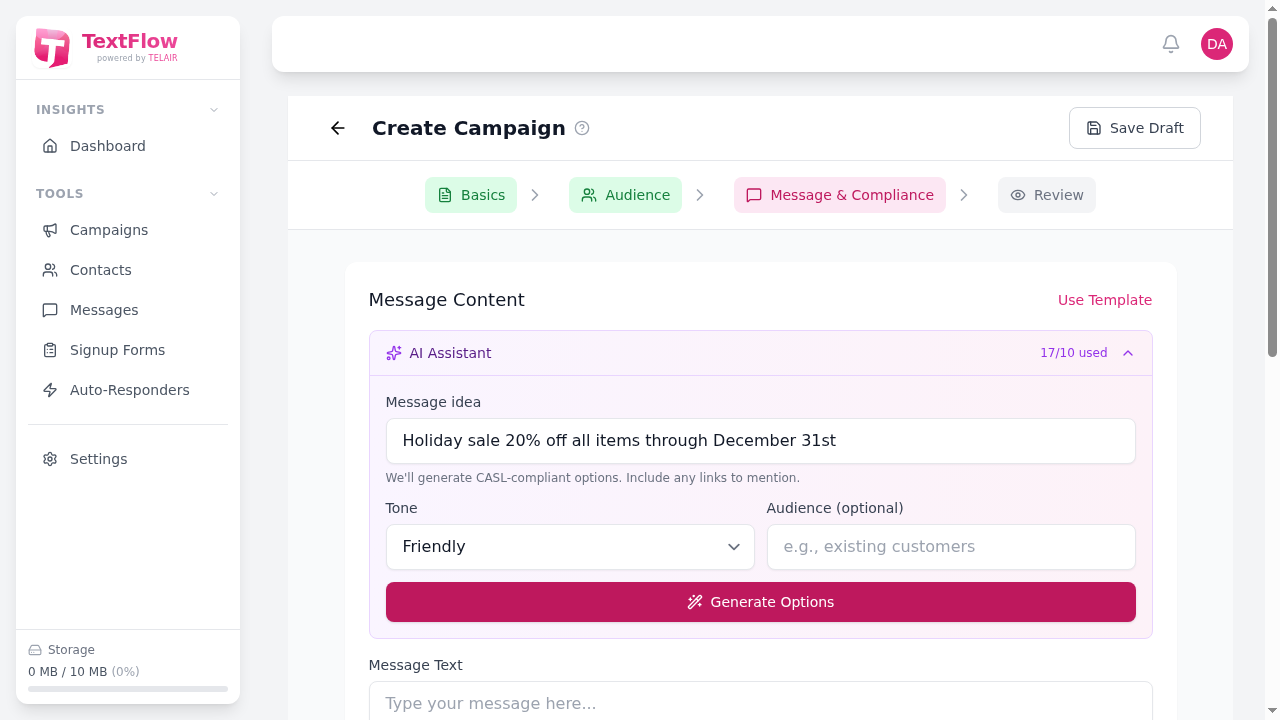
- In the AI Assistant panel, enter your message topic
- Select a tone and optionally specify your audience
- Click Generate Options
Generation Options
Section titled “Generation Options”| Field | Description |
|---|---|
| Topic/Idea | Describe what you want to promote or communicate |
| Tone | Professional, Friendly, Urgent, Casual, Formal |
| Audience | (Optional) Target demographic for tailored language |
Example Topics
Section titled “Example Topics”Good topic descriptions include:
- “Holiday sale 20% off all items through December 31st”
- “Appointment reminder for dental cleaning”
- “New product launch - wireless earbuds with 24hr battery”
- “Flash sale today only - buy one get one free”
Using Generated Messages
Section titled “Using Generated Messages”When the AI generates options:
- Review each variation
- Click Use This on your preferred option
- The message is inserted into your campaign
- Edit further if needed
Analyzing Messages
Section titled “Analyzing Messages”How to Analyze
Section titled “How to Analyze”- Write or paste your message in the campaign editor
- In the AI Assistant panel, scroll to Analyze Message
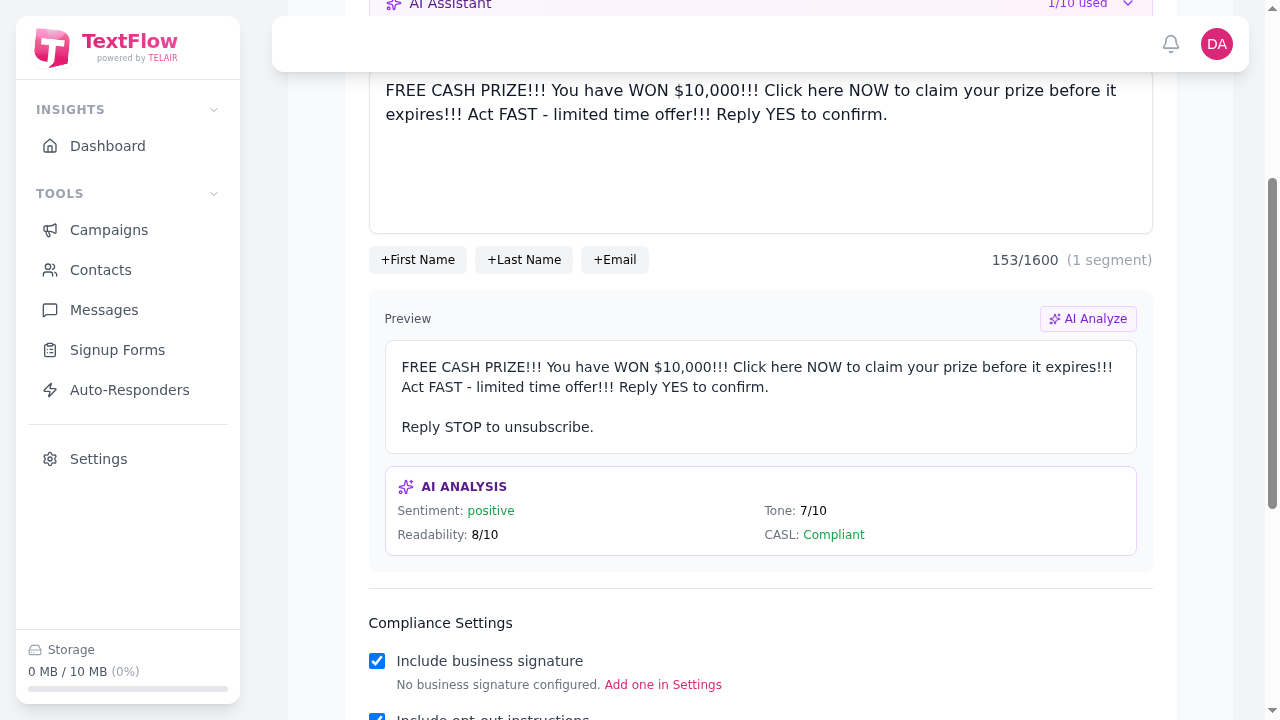
- Click Analyze for Compliance & Quality
What Gets Analyzed
Section titled “What Gets Analyzed”The AI checks your message for:
| Check | Description |
|---|---|
| CASL Compliance | Opt-out instructions, sender identification |
| Message Length | Character count and segment estimation |
| Spam Triggers | Words that may trigger carrier filtering |
| Tone Consistency | Professional vs casual language mix |
| Call-to-Action | Clear next steps for recipients |
| Personalization | Use of merge fields and personal touch |
Understanding Results
Section titled “Understanding Results”Results are color-coded:
| Color | Meaning |
|---|---|
| Green | Passes check |
| Yellow | Suggestion for improvement |
| Red | Issue that should be addressed |
Rewrite Suggestions
Section titled “Rewrite Suggestions”After analysis, the AI may offer rewrite suggestions:
- Click Apply Suggestion to use an improved version
- Click Ignore to keep your original message
Usage Limits
Section titled “Usage Limits”AI generations count against your monthly limit:
| Plan | Monthly Generations |
|---|---|
| Pro | 100 |
| Business | 500 |
| Enterprise | Unlimited |
What Counts as a Generation?
Section titled “What Counts as a Generation?”Each of these uses 1 generation credit:
- Clicking “Generate Options” (even if you don’t use results)
- Clicking “Analyze Message”
- Requesting rewrite suggestions
Tracking Usage
Section titled “Tracking Usage”View your usage in two places:
- AI Assistant panel header: Shows “X/Y used this month”
- Settings > Billing: Detailed usage breakdown
Best Practices
Section titled “Best Practices”Writing Good Topics
Section titled “Writing Good Topics”Be specific in your topic descriptions:
| Instead of… | Try… |
|---|---|
| ”Sale" | "Summer clearance sale 40% off clothing" |
| "Appointment" | "Dentist appointment reminder for tomorrow at 2pm" |
| "New product" | "Launching our new mobile app with exclusive features” |
Choosing the Right Tone
Section titled “Choosing the Right Tone”Match tone to your audience and message type:
| Tone | Best For |
|---|---|
| Professional | B2B, formal announcements |
| Friendly | Customer engagement, loyalty programs |
| Urgent | Flash sales, limited-time offers |
| Casual | Youth audiences, informal brands |
| Formal | Legal notices, official communications |
Review Before Sending
Section titled “Review Before Sending”AI-generated content should always be reviewed:
- Check accuracy of facts, dates, and URLs
- Verify prices and discount amounts
- Ensure brand voice consistency
- Test personalization variables
Don’t Over-Rely on AI
Section titled “Don’t Over-Rely on AI”Use AI as a starting point:
- ✅ Generate ideas when stuck
- ✅ Check compliance before major campaigns
- ✅ Get alternative phrasings
- ❌ Send without human review
- ❌ Ignore analysis warnings
- ❌ Use generic messages without customization
Troubleshooting
Section titled “Troubleshooting”Generation Failed
Section titled “Generation Failed”Possible causes:
- Monthly limit reached
- Network connectivity issue
- AI service temporarily unavailable
Solutions:
- Check your usage in Settings > Billing
- Wait a moment and try again
- Contact support if issue persists
Generated Messages Don’t Match Topic
Section titled “Generated Messages Don’t Match Topic”Possible causes:
- Topic description too vague
- Conflicting tone and audience
Solutions:
- Provide more specific topic details
- Include key points you want mentioned
- Try a different tone setting
Analysis Not Available
Section titled “Analysis Not Available”Possible causes:
- Message is too short (minimum 10 characters)
- AI features not enabled on plan
- Usage limit reached
Solutions:
- Ensure message has sufficient content
- Verify your plan includes AI features
- Check remaining generation credits
Privacy and Data
Section titled “Privacy and Data”How AI Uses Your Data
Section titled “How AI Uses Your Data”- Message content is sent to AI for processing
- No customer contact data is included
- Generated content is not stored by AI providers
- Your messages are not used to train AI models
Sensitive Content
Section titled “Sensitive Content”Avoid including in AI prompts:
- Personal customer information
- Credit card or financial details
- Health information (HIPAA)
- Passwords or security credentials
Next Steps
Section titled “Next Steps”- Creating Campaigns - Full campaign creation guide
- Message Templates - Save and reuse messages
- Auto-Responders - Automated message replies
The AI Assistant is your creative partner for SMS campaigns. Use it to generate ideas, ensure compliance, and craft messages that engage your audience!