
Profile Settings
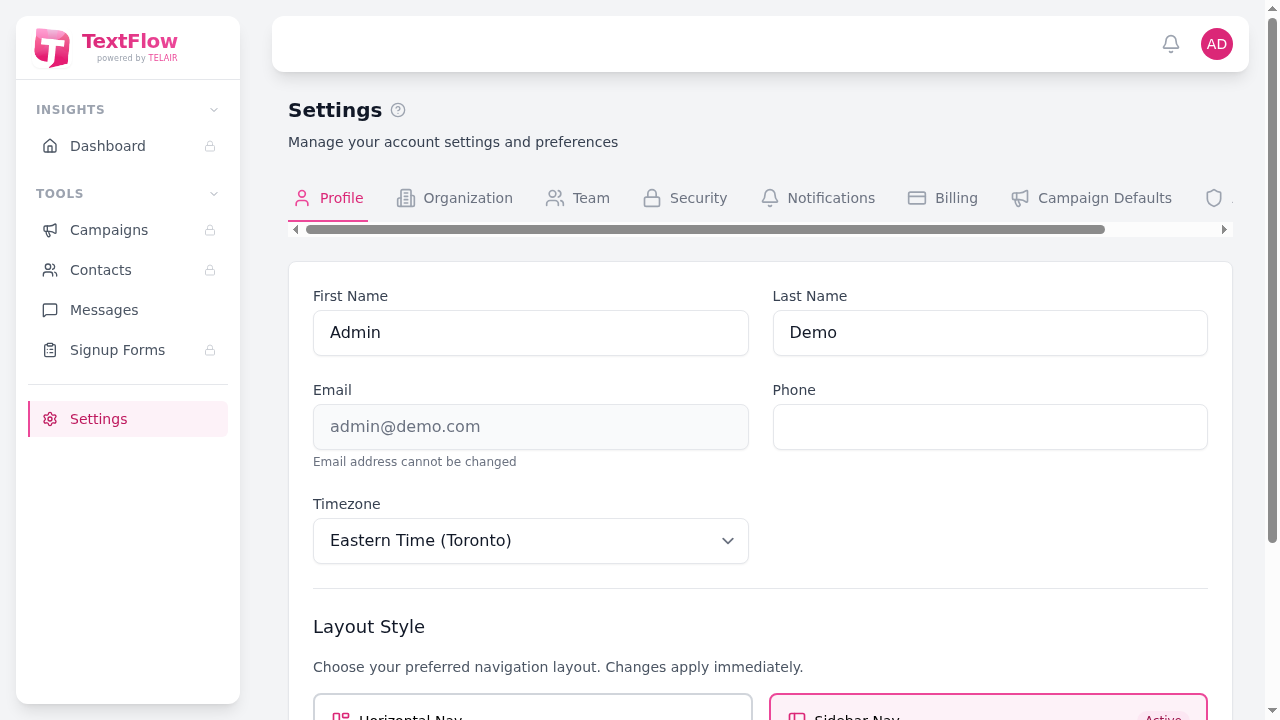
The Profile tab allows you to manage your personal account settings, including your name, contact information, timezone, and layout preferences.
Personal Information
Section titled “Personal Information”Update your first and last name. This is displayed throughout the platform and in email communications.
Your email address is shown but cannot be changed directly. Contact your administrator if you need to update your email address.
Add or update your phone number for account recovery purposes.
Timezone
Section titled “Timezone”Select your timezone to ensure:
- Scheduled campaigns display correct times
- Activity timestamps are accurate
- Quiet hours are calculated correctly
Available timezone options:
- Eastern Time (Toronto)
- Pacific Time (Vancouver)
- Central Time (Chicago)
- Mountain Time (Denver)
Layout Style
Section titled “Layout Style”TextFlow offers two navigation layout options:
Horizontal Nav
Section titled “Horizontal Nav”- Top navigation bar with icons and labels
- More vertical space for content
- Traditional web application style
Sidebar Nav
Section titled “Sidebar Nav”- Vertical sidebar with grouped navigation
- Easier access to all sections
- Modern dashboard style
The active layout is highlighted with an “Active” badge. Click on either option to switch layouts immediately - no page refresh required.
Saving Changes
Section titled “Saving Changes”After making changes, click the Save Profile button to save your settings. A confirmation message will appear when your changes are saved successfully.