
Campaign Defaults
The Campaign Defaults tab allows administrators to set organization-wide defaults for SMS campaigns, including quiet hours and message templates.
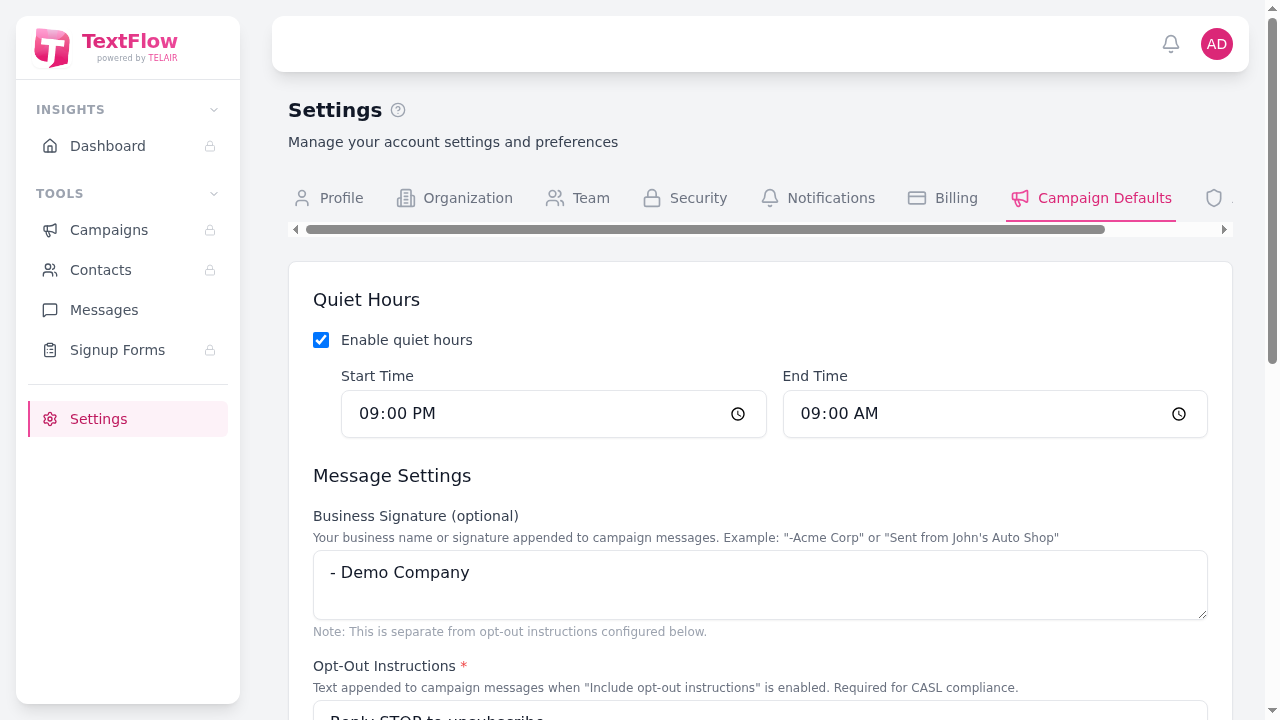
Quiet Hours
Section titled “Quiet Hours”Quiet hours prevent messages from being sent during specified times to respect recipients’ personal time.
Enable Quiet Hours
Section titled “Enable Quiet Hours”Toggle quiet hours on or off for your organization. When enabled, scheduled messages will be held until quiet hours end.
Start Time
Section titled “Start Time”Set when quiet hours begin (e.g., 9:00 PM). Messages scheduled during this time will be queued.
End Time
Section titled “End Time”Set when quiet hours end (e.g., 9:00 AM). Queued messages will begin sending after this time.
Message Settings
Section titled “Message Settings”Business Signature (Optional)
Section titled “Business Signature (Optional)”Add a signature that appears at the end of your campaign messages:
- Example:
-Acme Corp - Example:
Sent from John's Auto Shop
This helps recipients identify your business and builds brand recognition.
Opt-Out Instructions (Required)
Section titled “Opt-Out Instructions (Required)”The opt-out text appended to campaign messages when “Include opt-out instructions” is enabled:
Default: Reply STOP to unsubscribe.
This is required for CASL compliance. You can customize the wording but must include clear opt-out instructions.
Opt-Out/Opt-In Messages
Section titled “Opt-Out/Opt-In Messages”Customize the automatic confirmation messages sent when contacts opt out or opt in.
Opt-Out Confirmation Message
Section titled “Opt-Out Confirmation Message”Sent automatically when someone replies STOP, ARRET, or UNSUBSCRIBE:
Default:
You have been unsubscribed from {org_name} messages. You will not receive further marketing texts. Reply START to opt back in.Opt-In Confirmation Message
Section titled “Opt-In Confirmation Message”Sent automatically when someone replies START, YES, or SUBSCRIBE:
Default:
Welcome back! You have been re-subscribed to {org_name} marketing messages. Reply STOP to unsubscribe.Using Placeholders
Section titled “Using Placeholders”Use {org_name} in your messages to automatically insert your organization name.
Saving Changes
Section titled “Saving Changes”Click Save Changes to apply your campaign defaults. These settings apply to all new campaigns created after saving.